
SuiteCRM Slow or Freezing? What Actually Helps When Your CRM Outgrows a Single Server
A practical guide to improving the performance of a mature, data-heavy SuiteCRM — what normally causes slowdowns, which supporting components genuinely improve responsiveness and reliability, and when changing the deployment architecture starts to make business sense.
Request a SuiteCRM Performance & Architecture Assessment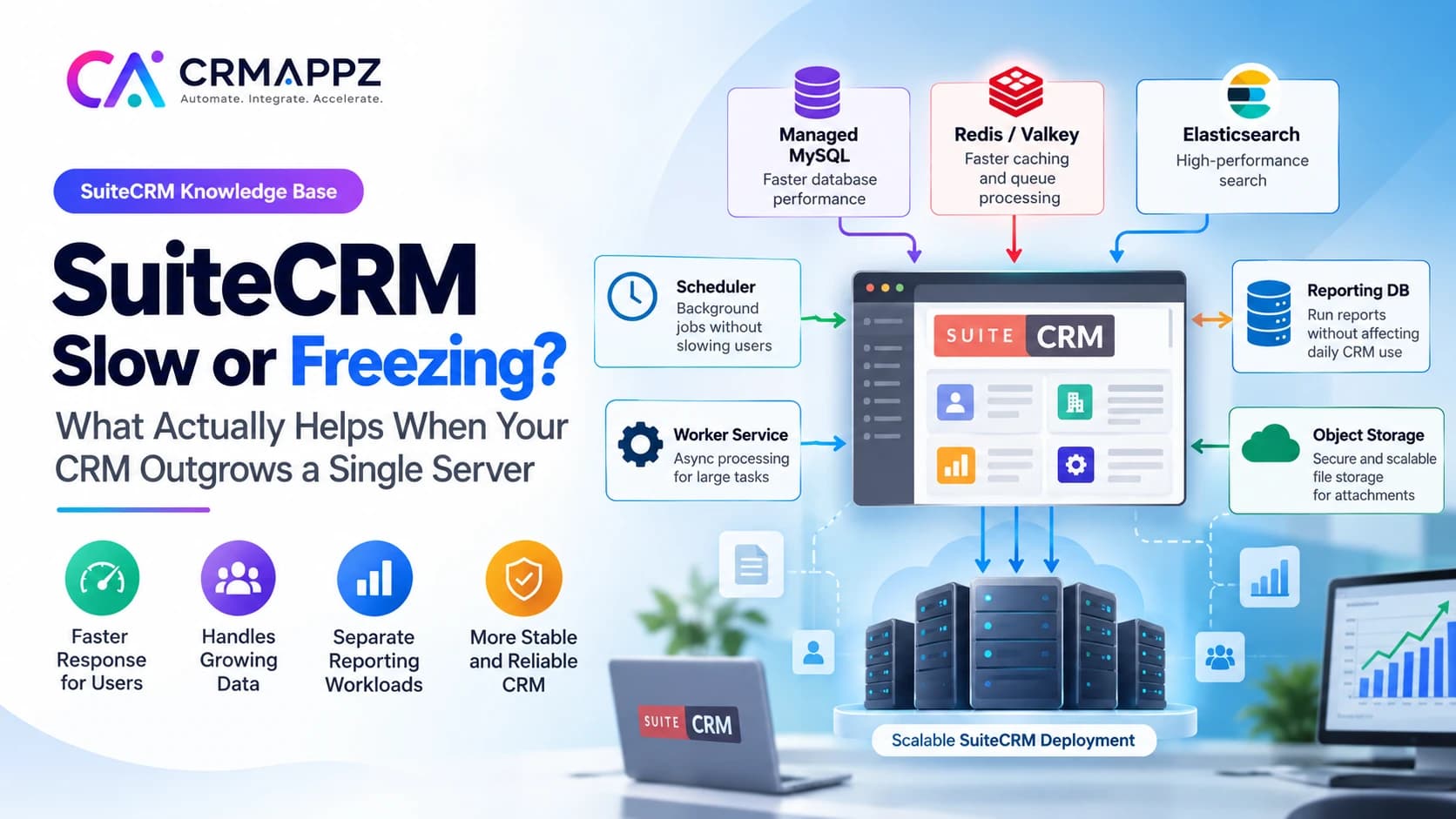
The CRM may now be carrying far more responsibility than when it was originally deployed: millions of records, years of activities and emails, custom fields, reports, integrations, workflows, scheduled jobs, API traffic and uploaded documents.
The application has grown with the business, but the infrastructure around it may still look much like it did several years ago.
We regularly see mature SuiteCRM installations where the web application, database, scheduler, search, reporting and file storage are still competing for resources on the same server. That can work perfectly well for a long time. But as data and usage increase, those workloads can begin slowing each other down.
At that point, improving SuiteCRM performance is not simply a matter of buying a larger server.
Sometimes the biggest improvement comes from a missing database index. Sometimes MySQL needs more dedicated memory. Sometimes reports are competing with normal CRM users. Sometimes scheduled jobs are causing predictable periods of slowdown. Sometimes full-text search has become too expensive for the transactional database. And sometimes the system really has reached the point where database, background processing, search, reporting and file storage should stop sharing the same infrastructure.
The useful question is not: How can we make SuiteCRM more complicated? It is: What is currently slowing our SuiteCRM, and what is the least complicated change that removes that bottleneck?
On this page
- A slow SuiteCRM is often a successful SuiteCRM that has grown
- “SuiteCRM is slow” can mean several completely different things
- Why a larger server sometimes helps — and sometimes does very little
- Why we normally investigate the database early
- So when does changing the architecture start to help?
- What improves when MySQL stops sharing resources with the application?
- Protecting interactive users from background work
- Where does Redis or Valkey fit?
- When does Elasticsearch make sense?
- What about reports?
- What about files and attachments?
- Does Docker make SuiteCRM faster?
- Will a second web node or a standby improve performance?
- What each component actually improves
- One architecture does not fit every SuiteCRM customer
- A practical example
- How this affects the people actually using SuiteCRM
- What should be measured before changing anything?
- Finding the real bottleneck before adding anything
- A sensible order for improving a mature SuiteCRM
- What we can and cannot promise
- A mature SuiteCRM does not necessarily need replacing
- SuiteCRM performance and architecture review checklist
- Frequently asked questions
A slow SuiteCRM is often a successful SuiteCRM that has grown
If a company has been running SuiteCRM for five or ten years, there is a good chance the CRM today looks very different from the system that was originally installed.
It may now contain:
- hundreds of thousands or millions of Accounts, Contacts, Leads or Activities
- years of emails and Notes
- custom modules
- hundreds of custom fields
- workflows
- scheduled reports
- ERP or accounting integrations
- website enquiries
- API integrations
- WhatsApp integrations
- campaign history
- audit history
- attachments and documents
- dashboards used by management
- imports and exports
- external applications continuously reading or writing data
That growth is not evidence that the CRM has failed. Usually it means SuiteCRM has become important enough to the business that far more is now expected from it.
The question is whether the original deployment has grown with those expectations.
A SuiteCRM used by 15 people with 50,000 records and a SuiteCRM used by 300 people with several million records are still the same product, but they are not the same workload.
That distinction matters.
“SuiteCRM is slow” can mean several completely different things
One of the first mistakes in a performance project is treating the word slow as a diagnosis. It is only a symptom.
Imagine five businesses tell us: “Our SuiteCRM has become slow.”
The first has a missing database index on a custom field used in almost every List View. The second has a large management report scanning years of transactional data. The third runs several expensive scheduled workflows during peak business hours. The fourth has a search problem. The fifth is genuinely exhausting the capacity of the web application.
All five users may describe their experience in exactly the same way. But the likely remedies are very different.
| What users experience | Possible underlying problem |
|---|---|
| List Views take a long time | SQL / indexing / database issue |
| Search is slow | Search workload |
| CRM slows down every morning | Scheduler / background jobs |
| CRM slows down when management runs reports | Reporting contention |
| Saving records is slow | Database / custom logic / API calls |
| Imports cause timeouts | Synchronous long-running work |
| CRM becomes slow with many concurrent users | PHP / web tier capacity |
| Disk is constantly full | Attachments / logs / backups |
| Everything becomes slow at once | Shared resource contention |
Giving all of these organisations another SuiteCRM web server would only help some of them.
Why a larger server sometimes helps — and sometimes does very little
The traditional answer to a slow business application is often: Increase CPU and RAM.
There is nothing inherently wrong with that. If the server is simply undersized, adding resources can be one of the easiest and most cost-effective improvements available.
But a larger server cannot fix every kind of performance problem.
Suppose a CRM page is slow because MySQL is scanning millions of records using an inefficient query. Increasing web-server CPU may make very little difference.
Suppose a report is using most of the database capacity. More PHP workers may simply allow more requests to queue against the same overloaded database.
Suppose a custom logic hook calls an external API every time an Opportunity is saved and waits five seconds for a response. Adding memory to the server does not remove those five seconds.
Which resource is saturated, and which operation is causing it?
Why we normally investigate the database early
Most useful SuiteCRM activity eventually reaches the database.
Opening an Account may look like one simple page to a user. Behind that page, SuiteCRM may need information from the Account itself, custom fields, users, security rules, Contacts, Opportunities, Cases, Activities, Notes and other relationships.
The larger the system becomes, the more important database behaviour becomes.
SuiteCRM's own performance guidance identifies missing database indexes as one of the most common causes of slow List Views and Reports in large datasets.
This is one of the reasons we would not recommend new infrastructure before understanding the existing SQL workload.
A company can spend significant money moving SuiteCRM to larger servers while the main user complaint is caused by a field that everybody filters on but which has no suitable index. That is not an infrastructure problem. It is a database-design problem.
Can database indexes really make that much difference?
Yes, under the right conditions.
A database index allows MySQL to locate relevant records without repeatedly scanning large portions of a table. On a small database, a poorly indexed query can remain almost invisible. On a large database, the same query can become expensive.
Custom fields deserve particular attention because mature SuiteCRM installations often accumulate many of them, and users frequently filter or report on those fields.
SuiteCRM recommends adding indexes to frequently searched fields and doing so through Vardefs so that the configuration remains compatible with SuiteCRM's repair and upgrade mechanisms.
Which fields do users search, filter, sort and report on most frequently? That answer can be more useful than knowing how many CPU cores the server has.
List Views themselves can become expensive on very large datasets
SuiteCRM List Views often need more than just the records displayed on the screen. Pagination may require counting the total number of matching records.
On very large tables, those count operations can become expensive.
SuiteCRM's performance documentation specifically discusses the cost of COUNT(*) queries on large datasets and provides configuration options to reduce that overhead where appropriate.
This is a good example of why performance tuning should not immediately be equated with adding infrastructure. Sometimes the first meaningful improvement is simply changing how a particular CRM function behaves against a large dataset.
PHP optimisation still matters
Before introducing several new infrastructure components, basic application tuning should already be correct.
One particularly important example is OPcache.
PHP normally needs to parse and compile application code before it can execute it. OPcache keeps compiled PHP bytecode in memory so it can be reused between requests.
SuiteCRM's current production guidance recommends enabling OPcache and states that doing so can greatly improve performance.
This is not a glamorous infrastructure change. But mature systems often benefit more from getting the fundamentals right than from adding another service simply because it sounds more scalable.
So when does changing the architecture start to help?
The architecture becomes interesting when the problem is no longer one badly tuned component. It becomes interesting when several different workloads are competing with each other.
A traditional installation may look roughly like this:
Users
  │
  ▼
SuiteCRM / PHP / Web server
  ├─ normal user requests
  ├─ scheduler
  ├─ workflows
  ├─ email processing
  ├─ reports
  ├─ search
  ├─ imports
  └─ file handling
  │
  ▼
MySQL
Everything ultimately competes for some combination of CPU, RAM, PHP workers, database connections, disk I/O, filesystem access and database locks.
Once that competition becomes measurable, a more separated architecture can start producing real value.
What can a more mature SuiteCRM deployment look like?
There is no single architecture that every SuiteCRM installation should use. A larger environment may gradually evolve toward something like this:
                      USERS
                        │
                        ▼
                  Reverse proxy
                        │
                        ▼
                  SUITECRM WEB
                        │
       ┌────────────────┼────────────────┐
       ▼                ▼                ▼
    MySQL          Elasticsearch     Object storage
 (system of         (search)           (files)
  record)
       │
       ├──► Read replica ──► Reporting
       └──► Standby / HA

  Scheduler ─────► scheduled SuiteCRM jobs
  Worker    ─────► asynchronous workloads
  Redis / Valkey ─► suitable cache workloads
                 └─► queue use cases where justified
This is more complex than a single SuiteCRM server. That is not automatically a benefit.
The reason to introduce this architecture is that each component can take responsibility for a workload that is already putting pressure on the existing system.
What improves when MySQL stops sharing resources with the application?
A traditional SuiteCRM server may be running Apache or another web server, PHP, MySQL, local file storage, logs, schedulers and possibly search or reporting software. All of those processes compete for the same machine.
Separating MySQL onto dedicated or managed database infrastructure gives the database its own memory, CPU and storage resources.
This can be particularly useful because MySQL benefits heavily from having enough memory available for frequently accessed data.
SuiteCRM's own performance guidance highlights innodb_buffer_pool_size as a MySQL setting where an appropriate increase can make a significant difference.
The practical business benefit is often not simply that one query becomes faster. It is that CRM performance becomes more predictable because a spike in PHP or filesystem activity no longer directly consumes memory intended for the database.
What dedicated or managed MySQL can improve
- database resource isolation
- predictable memory availability
- database storage performance
- independent database scaling
- backup and recovery options
- high-availability options
What it does not fix
- poor SQL
- missing indexes
- inefficient custom code
- expensive logic hooks
- badly designed reports
A badly designed query remains a badly designed query even on expensive database infrastructure.
Protecting interactive users from background work
Can a separate scheduler improve SuiteCRM performance?
It can improve the experience of interactive users when scheduled work is consuming significant resources.
SuiteCRM schedulers perform important background jobs including workflows, email checks, report generation and other maintenance work. SuiteCRM requires scheduler execution for those operations to function correctly.
The problem is not that these jobs exist. The problem appears when a large scheduled workload begins at exactly the same time users are trying to work.
Consider a business where 150 users begin work around 9:00 AM. At roughly the same time the CRM begins:
- inbound email processing
- workflow evaluation
- report generation
- campaign processing
- data maintenance
- search indexing
To the user, there is no visible distinction between those workloads. They simply see a slower CRM.
Separating scheduled processing does not necessarily make the scheduler itself faster. It can prevent scheduler activity from taking all the execution resources intended for interactive users.
What changes with SuiteCRM 8.10 background workers?
This is one of the more important recent changes in SuiteCRM.
SuiteCRM 8.10 introduced an asynchronous background-task framework based on Symfony Messenger.
SuiteCRM describes the purpose clearly: long-running operations can be placed on a queue and processed by a separate worker rather than blocking the application or tying up the web server.
The idea is straightforward. Without asynchronous processing, a large task can hold the request open:
- User starts large task
- PHP performs all work
- Browser waits
- Possible timeout
With asynchronous processing, the pattern can become:
- User starts task
- Task enters queue
- Web request returns
- Worker processes task
This matters more as data volumes grow. Long-running operations are exactly the kind of work that should not unnecessarily hold an interactive HTTP request open.
SuiteCRM 8.10's installation guidance now requires both the traditional scheduler and a Messenger worker for async tasks to operate correctly. That is a meaningful architectural step for the platform.
Does that mean every heavy SuiteCRM operation is now asynchronous?
No. This is important.
SuiteCRM 8.10 introduces the async framework, but the current documented use cases initially include migration-related tasks and other supported operations. SuiteCRM's documentation says additional long-running workloads are intended to move toward the same model over time.
So we would not tell a customer: Add a worker and every slow SuiteCRM process disappears from the web request. That would be inaccurate.
Custom code and older synchronous processes still need to be analysed individually.
Where does Redis or Valkey fit?
Redis and Valkey are frequently mentioned in modern application architectures, but they should not be presented as magic performance switches. Their value depends on what is using them.
SuiteCRM's performance guidance explains that filesystem-backed caching can become an I/O bottleneck in high-traffic environments and documents Redis as an external caching option.
That means an external cache can potentially help by moving suitable temporary/cache workloads away from repeated filesystem access.
SuiteCRM 8.10's Messenger architecture also allows different queue transports. Its documented default is a Doctrine/database-backed queue, while other transports may be used depending on the environment and throughput requirements.
Where Redis or Valkey may help
- high-traffic caching
- reducing selected filesystem cache I/O
- shared cache requirements
- queue transport where justified
- environments with multiple application instances
Where it will not help
- missing MySQL indexes
- a slow SQL join
- a report scanning millions of rows
- inefficient SuiteCRM custom code
So if a customer's primary problem is one badly performing List View query, Redis may add another server without materially improving the complaint.
When does Elasticsearch make sense?
Search is a specialised workload.
A relational database is excellent at maintaining transactional business data and relationships. Full-text search is a different problem.
SuiteCRM supports Elasticsearch integration specifically to improve search quality and search time. Search-enabled CRM modules can be indexed in Elasticsearch, and queries can then be executed by the search engine rather than relying entirely on relational database searching.
This becomes increasingly useful where users search large volumes of text across modules such as Accounts, Contacts, Leads, Cases, Notes and Emails.
MySQL          ──►  transactional system of record
Elasticsearch  ──►  searchable index
Elasticsearch does not replace MySQL. It handles the workload for which it is specialised.
What does Elasticsearch actually improve?
Primarily:
- full-text search performance
- search quality
- searching across large text datasets
- reducing some search pressure on the transactional database
SuiteCRM documents several mechanisms for keeping the Elasticsearch index synchronised, including record updates, scheduled synchronisation and manual indexing.
What Elasticsearch does not automatically improve
- ordinary record saves
- all List Views
- reports
- workflows
- every API request
It solves the search workload. That is exactly why it can be valuable when search is the actual problem.
What about reports?
Reporting creates a very different kind of database activity from day-to-day CRM operations.
A normal salesperson might perform relatively focused transactions: open a customer, create an Opportunity, update a stage, record a Call or save a Case.
A management report may request several years of data, multiple joins, grouping, counts, sums, date aggregation and comparisons across teams or territories.
Those operations can coexist on one database until the reporting workload becomes large enough to affect operational users.
At that point, one option is a reporting or read replica.
Primary database
      │
      └── replication ──► Reporting database
                                │
                                ▼
                           BI / Metabase
The sales user continues working against the primary transactional system. Management reporting uses a database copy intended for read-heavy analysis.
The result can be significant if reporting was previously one of the main causes of database pressure. If you are formalising dashboards and management reporting, our analytics and reporting guidance covers how to define measures and separate analytical reads from operational ones.
A sales report should not make a salesperson wait to open an Account
This is where architecture becomes a business issue rather than an infrastructure issue.
Imagine management runs a three-year sales-conversion analysis. At exactly the same time, a salesperson is trying to open an Account before speaking to a customer.
If both workloads compete for the same constrained database resources, the salesperson may experience the management report as a slow CRM. They do not know why. They simply wait.
Separating analytical workloads gives the organisation the ability to perform more reporting without necessarily punishing operational users. That is often a more meaningful benefit than saying: We added another database.
Does a read replica make every SuiteCRM query faster?
No.
If reporting was not causing any noticeable pressure, adding a reporting replica may provide little improvement to ordinary user response times.
It also introduces another consideration: replication is not necessarily instantaneous. Analytical data may be slightly behind the primary database.
That is often acceptable for sales dashboards, management reporting, historical analysis and monthly or quarterly reporting. It may not be acceptable for a workflow that must know whether a transaction occurred a few seconds ago.
That is why operational reads and analytical reads should be treated differently.
What about files and attachments?
Data-heavy SuiteCRM environments do not only grow in database size. Attachments and documents can become substantial over time.
Traditionally, local application storage means the CRM server may contain both the application runtime and years of business files.
That creates several operational problems:
- application disks continue growing
- server replacement becomes more complicated
- backups become larger
- multiple application nodes require shared access to files
- application and file I/O can compete
SuiteCRM 8.9 introduced a newer media-storage architecture based on Flysystem, with configurable storage backends including local storage, AWS S3 and Azure Blob for supported media types.
This gives SuiteCRM a more modern path toward separating application compute from file storage.
Why object storage can matter even if it does not make pages noticeably faster
Object storage should not be sold primarily as a page-speed improvement. Its stronger benefits are operational.
Imagine a SuiteCRM server holding hundreds of gigabytes or several terabytes of uploaded files.
That changes disaster recovery, maintenance and future scaling significantly. It also means the application server does not need to become a permanent archive of every document the business has accumulated.
Can DigitalOcean Spaces be used?
DigitalOcean Spaces exposes an S3-compatible API.
SuiteCRM's current file-storage documentation directly documents AWS S3 and Azure Blob through its Flysystem-based storage configuration.
An S3-compatible service such as Spaces may therefore be technically suitable depending on the adapter and features being used, but we would test that combination before treating it as identical to AWS S3.
For a production CRM, “S3 compatible” should not be interpreted as: Every AWS S3 behaviour is automatically identical. The storage path should be validated with the actual SuiteCRM media workflows being used.
Does Docker make SuiteCRM faster?
Not inherently. This is another distinction worth making.
Containerising SuiteCRM does not turn a five-second SQL query into a one-second SQL query.
Docker's value is primarily operational:
- repeatable environments
- controlled PHP versions
- consistent extensions
- predictable deployment
- easier replacement of an application instance
- clearer separation between web, scheduler and worker processes
- simpler rollback
Those advantages can contribute to a better operated CRM. But Docker itself should not be sold as a performance accelerator.
Why separate containers can still improve real-world behaviour
Even though Docker itself does not make PHP fundamentally faster, process isolation can prevent one workload damaging everything else.
Consider a worker consuming excessive memory. Without isolation, pressure can cascade:
- Worker consumes memory
- Operating-system pressure
- Database suffers
- Web server suffers
- CRM appears frozen
With better isolation:
- Worker becomes unhealthy
- Worker is limited or restarted
- Web application remains available
The value is fault isolation. That is an important operational improvement even if a benchmarked Account page is not faster.
Will a second web node or a standby improve performance?
Adding a second SuiteCRM application server only helps if the application/web tier is actually the limiting factor.
If   Web CPU 95%   /  Database CPU 30%
     → additional application capacity may help

If   Web CPU 25%   /  Database CPU 100%
     → more web servers can simply generate more requests
       against an already constrained database
This is why horizontal scaling should follow measurement.
Multiple SuiteCRM nodes also introduce requirements around shared state. They need consistent access to the same database, application configuration, required files, compatible session behaviour and the same application version.
Horizontal scaling is valuable when needed. It should not be the first answer to every performance problem.
High availability and performance are not the same thing
This distinction is frequently missed.
A standby database can provide faster recovery from database failure. It does not necessarily make the normal CRM faster.
A second web node can provide application redundancy. It may or may not improve database-bound workloads.
Object storage improves storage resilience and portability. It may not noticeably change a Contact List View.
A private network improves security. It does not fix an inefficient query.
These are all worthwhile technologies. But they solve different problems.
What each component actually improves
| Component | Main improvement | Does it directly improve user speed? |
|---|---|---|
| Database indexing | Faster SQL access | Often yes |
| MySQL tuning / sufficient memory | Database performance | Often yes |
| OPcache | PHP execution efficiency | Yes |
| Dedicated / managed MySQL | Resource isolation | Often, if DB contention exists |
| Separate scheduler | Background workload isolation | Often under load |
| SuiteCRM worker | Supported async workloads | Yes for affected operations |
| Redis / Valkey | Cache / temporary workload | Potentially |
| Elasticsearch | Full-text search | Yes for search |
| Reporting replica | Isolates analytics | Yes if reporting causes DB pressure |
| Object storage | Storage / recovery / scaling | Usually little direct page-speed effect |
| Second web node | More web capacity | Only if web tier is constrained |
| Database standby | Availability | No meaningful normal-query speed gain |
| Docker | Repeatability / isolation | Little direct gain |
| VPC / firewall | Security | No direct gain |
| Monitoring | Diagnosis | Indirect but highly valuable |
This is the reason we prefer component-by-component analysis over saying: Move SuiteCRM to distributed infrastructure.
One architecture does not fit every SuiteCRM customer
There are organisations where a tuned single server remains entirely sensible.
For example, a business may have a modest number of users, manageable data volume, few integrations, light reporting, minimal background processing and no measurable resource contention.
Moving that CRM onto multiple application nodes, Redis, Elasticsearch, object storage and several managed services may increase cost and operational complexity without producing a meaningful benefit for users.
In those situations, we would normally concentrate first on database indexing, PHP configuration, OPcache, scheduler behaviour, query performance, custom code and available memory and storage.
When does a more separated architecture become easier to justify?
There is no single record count where SuiteCRM suddenly requires distributed infrastructure. We start paying more attention when several of the following become true:
- millions of business records
- hundreds of active users
- substantial custom modules
- frequent integrations
- continuous API activity
- heavy workflows
- recurring imports
- management reporting affecting user activity
- large file storage
- search becoming noticeably slow
- scheduled jobs creating predictable slow periods
- CRM downtime having clear business cost
The combination matters more than any one number.
A practical example
Consider a distribution company that has used SuiteCRM for eight years. It now contains:
- 2 million customer and contact records
- several million activities
- product-related custom modules
- ERP integration
- website enquiries
- WhatsApp communication
- daily scheduled imports
- years of uploaded documents
- management dashboards
- 200 regular users
Originally, everything ran on one server.
As usage grew, users started reporting Accounts taking longer to open, search becoming inconsistent, the system slowing every morning, reports occasionally causing widespread delay, imports timing out and frequent storage pressure.
It would be tempting to conclude: SuiteCRM cannot handle the business anymore. But those symptoms describe several different pressures.
| Symptom | Likely cause |
|---|---|
| Slow Account List View | Missing / custom index |
| Morning slowdown | Scheduled workflow |
| Slow search | Search workload |
| Report-related slowdown | Analytics hitting the production DB |
| Import timeout | Long-running synchronous processing |
| Disk pressure | Attachment growth |
Now the improvement plan becomes much more precise.
The organisation may keep SuiteCRM while changing the environment around it. That is a very different decision from replacing the CRM.
How this affects the people actually using SuiteCRM
Sales
A salesperson should be able to find and open a customer record without caring whether a report or background process is running.
Customer service
Case handling should remain predictable even when the system is processing scheduled jobs.
Management
Reporting should not require choosing between business intelligence and CRM responsiveness.
Operations
Imports and integrations should be able to process large volumes without making the user interface unusable.
IT
A slow CRM should be diagnosable rather than producing the vague incident: “SuiteCRM seems slow today.” This is where performance architecture becomes operational effectiveness.
Small delays become large when multiplied across an organisation
Suppose 150 employees each perform 100 CRM interactions during a working day. That is 15,000 interactions per day.
If an avoidable delay adds an average of only three seconds per interaction, the accumulated waiting time is 45,000 seconds — approximately 12.5 hours every day.
That calculation is only illustrative; real systems need to be measured. But it shows why seemingly small performance issues matter in heavily used business software.
Performance also affects user trust in the CRM
This is harder to benchmark but very real operationally.
When employees lose confidence in their CRM, they begin working around it:
- maintaining spreadsheets
- delaying updates
- keeping notes outside the CRM
- avoiding reports
- entering less information
- creating duplicate processes
A responsive and reliable CRM makes it easier for the business to keep the CRM as the source of operational truth. That is one reason performance matters beyond infrastructure metrics.
What should be measured before changing anything?
Before recommending infrastructure, we would want a baseline.
User response
- slowest modules
- average response time
- high-percentile response time
- time to open List Views
- record-save latency
Database
- slow queries
- CPU
- memory
- disk I/O
- connection usage
- locks
- frequently filtered fields
- largest tables
Application
- PHP resource usage
- web-worker saturation
- OPcache status
- memory exhaustion
- fatal errors
Background processing
- scheduler duration
- scheduler overlap
- delayed jobs
- async-worker queue depth
- failed jobs
Search
- search latency
- index status
- indexing workload
Reporting
- expensive reports
- peak reporting periods
- impact on the primary database
Storage
- upload growth
- log growth
- backup size
- available disk
Without that baseline, performance improvements become difficult to prove.
Finding the real bottleneck before adding anything
A CRM performance issue can come from the database, PHP, custom code, scheduler jobs, search, reporting, storage, integrations or the infrastructure itself.
Before recommending additional services, we normally want to determine which of those areas is actually creating the user-visible problem.
A practical assessment can review:
- current SuiteCRM deployment
- database size and query behaviour
- custom fields and indexes
- PHP / web-server configuration
- scheduled jobs
- workflows
- integrations
- reporting workload
- search
- file-storage growth
- application and database resource utilisation
The aim is to answer three questions:
- What is slowing SuiteCRM today?
- Which changes would materially improve it?
- Which additional technologies are unnecessary for the current workload?
Not sure what is actually making your SuiteCRM slow?
A SuiteCRM Performance & Architecture Assessment can identify whether the pressure is coming from the database, customisation, scheduler, search, reporting, storage, integrations or application infrastructure — and which changes are likely to produce a measurable improvement.
A sensible order for improving a mature SuiteCRM
Establish the baseline
Understand what users are experiencing and what the infrastructure is doing when the problem occurs.
Fix obvious application and database issues
Look at missing indexes, slow queries, PHP configuration, OPcache, oversized List Views, expensive custom logic and unnecessary historical/tracker growth.
Give the database appropriate resources
If MySQL is competing with the web application or clearly resource-constrained, dedicated database resources may be the next high-value step.
Separate heavy background processing
Review the scheduler and SuiteCRM 8.10 async-worker workloads.
Address search if search is actually a bottleneck
Introduce Elasticsearch when the search workload justifies it.
Move heavy reporting away from the primary transactional workload
Use an appropriate reporting architecture if management analytics are materially affecting users.
Externalise growing file storage where appropriate
SuiteCRM 8's newer media-storage capabilities make this increasingly practical for supported file types.
Add application redundancy or horizontal capacity if the web tier needs it
Only after shared state and the actual bottleneck are understood.
This sequence keeps the project centred on measurable problems.
What happens if you add everything at once?
You can absolutely make SuiteCRM harder to operate.
A simple deployment is SuiteCRM, MySQL and a web server. A distributed environment may contain SuiteCRM, a reverse proxy, Docker, a scheduler, a worker, Redis, Elasticsearch, managed MySQL, a replica, object storage, a reporting platform, monitoring and private networking.
Every component solves something. Every component is also another thing that can fail, needs monitoring, needs upgrading, needs backup or recovery planning and can be misconfigured.
A company without the operational capability to maintain that environment may end up with a technically sophisticated architecture that is less reliable than the original system.
When can this architecture make SuiteCRM worse?
This deserves an honest answer. It can make things worse when:
- components are added without identifying a bottleneck
- database queries are still inefficient
- custom code assumes everything is on the local filesystem
- multiple web instances are introduced without understanding shared state
- Elasticsearch is installed but poorly sized or maintained
- Redis is introduced without a real cache/queue use case
- reporting remains on the same overloaded primary database
- monitoring is absent
- the operating team does not understand the new dependencies
Distributed architecture is not automatically superior to a well-tuned monolith. It is superior when the workload has genuinely outgrown the monolith.
What we can and cannot promise
We would not publish a statement such as: “This architecture makes SuiteCRM five times faster.” There is no honest way to make that promise without measuring the customer's current installation.
Different bottlenecks produce different gains. A missing database index may produce a dramatic improvement. A new object-storage service may produce almost no difference in ordinary page response. A reporting replica may make a huge difference for one business and almost none for another.
That is why performance improvement should be measured against the original baseline.
What we can say confidently
Proper indexing can materially improve large SuiteCRM databases — SuiteCRM's own guidance identifies missing indexes as a common cause of slow List Views and Reports.
OPcache should be part of a properly configured production environment — SuiteCRM recommends it for production performance.
Heavy background work should not unnecessarily block interactive users — SuiteCRM 8.10's new asynchronous architecture exists specifically to move supported long-running processing onto background workers.
Elasticsearch can materially improve the right search workload — SuiteCRM documents Elasticsearch integration specifically for improving full-text search quality and speed.
External caching can help high-traffic environments — SuiteCRM's performance documentation identifies filesystem cache I/O as a possible bottleneck and documents Redis as an alternative.
External file storage is becoming a first-class SuiteCRM 8 capability — SuiteCRM 8.9+ includes Flysystem-based media storage with local, AWS S3 and Azure Blob options for supported storage types.
The bigger architectural idea: workload isolation
The most useful way to understand this subject is not through product names. It is through workloads.
Interactive application workload
Users opening, editing and creating CRM records.
Transactional database workload
Maintaining the core business data and relationships.
Background processing
Schedulers, workflows, migrations and other long-running tasks.
Search workload
Full-text discovery across large datasets.
Analytical workload
Reports and management dashboards.
File workload
Documents, images and attachments.
When they are small, all six may comfortably coexist. When one or more become large, separating them allows each workload to be tuned without unnecessarily affecting the others. That is the real reason the architecture can improve SuiteCRM.
A mature SuiteCRM does not necessarily need replacing
This is probably the most important business conclusion.
When an established CRM becomes slow, organisations can jump too quickly from: “The CRM is slow” to: “We need another CRM.” Those are not the same statement.
If the platform still supports the business model, the data model is valuable, users know the system, integrations are established and custom processes are working, there may be considerable value in improving the environment rather than replacing the platform. This is also where a SuiteCRM implementation and optimisation partner can help weigh improvement against replacement.
Is SuiteCRM itself preventing the business from operating effectively, or has the workload simply outgrown the way SuiteCRM is currently deployed?
Those lead to very different projects.
When would we recommend keeping the current architecture simple?
Quite often.
If the system remains responsive, resource utilisation is healthy and there is no evidence that reporting, scheduling, search or storage are interfering with normal users, we would not add several services purely for architectural elegance.
A well-configured SuiteCRM running on appropriate infrastructure can remain the simpler and better solution.
The goal is not to reach the most sophisticated diagram. The goal is to maintain a reliable CRM with the lowest reasonable operational complexity.
When would we consider a deeper architecture review?
We would give more attention to infrastructure when the organisation recognises patterns such as:
- SuiteCRM has become progressively slower as data grew
- List Views or filters are consistently expensive
- large reports affect other users
- scheduled jobs create repeatable slow periods
- imports or long-running jobs cause timeouts
- search performance is becoming a complaint
- database resources remain heavily utilised
- local file storage is becoming difficult to manage
- multiple integrations are continuously accessing the CRM
- the CRM has become important enough that outages carry significant business cost
At that point, repeatedly increasing one server can eventually become less effective than separating selected workloads. Where those pressures come from integrations continuously reading or writing CRM data, reviewing how those interfaces behave is part of the same picture.
SuiteCRM performance and architecture review checklist
Database
- Which tables are largest?
- Which queries are slowest?
- Are commonly searched custom fields indexed?
- Are large List Views doing unnecessary work?
- Is MySQL memory correctly configured?
- Is the database competing with the application for resources?
Application
- Is OPcache enabled?
- Are PHP workers saturated?
- Are custom logic hooks doing expensive work?
- Are external APIs called synchronously during record saves?
Scheduler
- Which jobs run?
- How long do they take?
- Do jobs overlap?
- Do slow periods correspond with scheduler activity?
Workers
- Is SuiteCRM 8.10's Messenger worker configured correctly?
- Are supported asynchronous jobs being processed?
- Are queues growing or failing?
Search
- Is search actually a bottleneck?
- Would Elasticsearch solve a genuine user problem?
- Is indexing healthy?
Reporting
- Which reports are expensive?
- Do reporting periods coincide with user complaints?
- Would a separate analytical database provide enough benefit?
Storage
- How much local storage is being consumed?
- What portion is application code versus files versus logs?
- What file types can appropriately use external storage?
Reliability
- What happens if the server fails?
- What is the recovery time?
- Are backups tested?
- Is the CRM important enough to justify standby or redundant infrastructure?
If those questions cannot be answered, adding infrastructure is largely guesswork.
Frequently asked questions
Can SuiteCRM handle millions of records?
SuiteCRM can be used with large datasets, but record count alone is not enough to predict performance. Indexes, relationships, custom fields, query patterns, concurrent users, workflows, reporting and infrastructure all affect the result. A CRM with several million well-indexed records may behave better than a much smaller installation with inefficient customisations or expensive reports.
Will moving SuiteCRM to a managed database make it faster?
It can, particularly if MySQL currently competes with PHP, the web server or disk-heavy workloads. It also makes database resources easier to size independently. It will not fix inefficient SQL or missing indexes.
Will Redis make SuiteCRM faster?
It can improve suitable caching or queue workloads, particularly in higher-traffic environments. It is not a replacement for database tuning.
Will Elasticsearch make SuiteCRM faster?
It can make full-text search considerably more appropriate for large search workloads and reduce search pressure on MySQL. It does not improve every area of SuiteCRM.
Does SuiteCRM 8.10 support background workers?
Yes. SuiteCRM 8.10 introduced Symfony Messenger-based async tasks and requires a Messenger worker for those supported background operations.
Should the scheduler run separately from the web application?
The important objective is ensuring scheduler workloads cannot unexpectedly exhaust the resources needed by interactive users. How that is implemented depends on the deployment. For larger environments, clearer process/resource separation can make behaviour easier to control and diagnose.
Will Docker improve SuiteCRM speed?
Docker itself provides little inherent performance improvement. Its main value is repeatability, deployment consistency, process isolation and easier infrastructure management.
Should reporting use the production SuiteCRM database?
Light reporting may be perfectly acceptable on the main database. When large analytical queries begin affecting normal CRM use, separating reporting becomes worth considering.
Should every SuiteCRM use this architecture?
No. A smaller SuiteCRM with a healthy workload may be better served by a simple, properly tuned deployment. The supporting architecture should grow when the workload justifies it.
Final thoughts
A SuiteCRM that has accumulated years of customer data, integrations, workflows, reports and documents should not necessarily be expected to behave like the small installation that was first deployed.
That is not a criticism of SuiteCRM. It is what happens when an application becomes important to a business.
The mistake is assuming there are only two choices: Keep buying a larger server, or replace SuiteCRM. There is a substantial middle ground.
Database indexing and PHP optimisation may remove immediate bottlenecks. Dedicated database resources can stop MySQL competing with the application. Schedulers and workers can protect interactive users from background work. Elasticsearch can take responsibility for large search workloads. A reporting replica can prevent analytical queries from competing with day-to-day CRM use. External storage can prevent the application server becoming a permanent file archive. And application redundancy can be introduced when the business genuinely requires it.
None of these components should be added simply because they are available. But when the workload already exists, using the right component for the right job can materially improve how SuiteCRM performs and how reliably the organisation can operate it.
For organisations planning to keep SuiteCRM as a long-term operational platform, that can be a much more controlled path than starting again with a different CRM.
Is your SuiteCRM becoming slower as data and usage grow?
We help organisations review mature SuiteCRM environments before recommending infrastructure changes — identifying whether the real pressure is coming from the database, customisation, scheduler, search, reporting, storage, integrations or application infrastructure.
Verification references
SuiteCRM features, documented capabilities and version numbers change over time. The details in this article were accurate at the time of review; confirm the current position against the official SuiteCRM sources below before acting.
Related knowledge
More SuiteCRM guides in preparation
- Is SuiteCRM 7 End of Life?
- SuiteCRM 7 vs SuiteCRM 8
- SuiteCRM 7 to 8 Migration Checklist
- What Happens to Customisations During SuiteCRM 8 Migration?
- SuiteCRM 8 Migration Risks
- SuiteCRM Migration Cost
- SuiteCRM Migration Readiness Assessment
- How to Audit SuiteCRM Before Migration