WhatsApp CRM Integration in Dubai: How Small Businesses Can Automate Enquiries, Follow-Ups and Appointments
A practical guide for Dubai businesses looking to connect WhatsApp with CRM, automate enquiry capture, manage lead qualification, schedule appointments and keep existing +971 numbers.
Request a WhatsApp CRM Assessment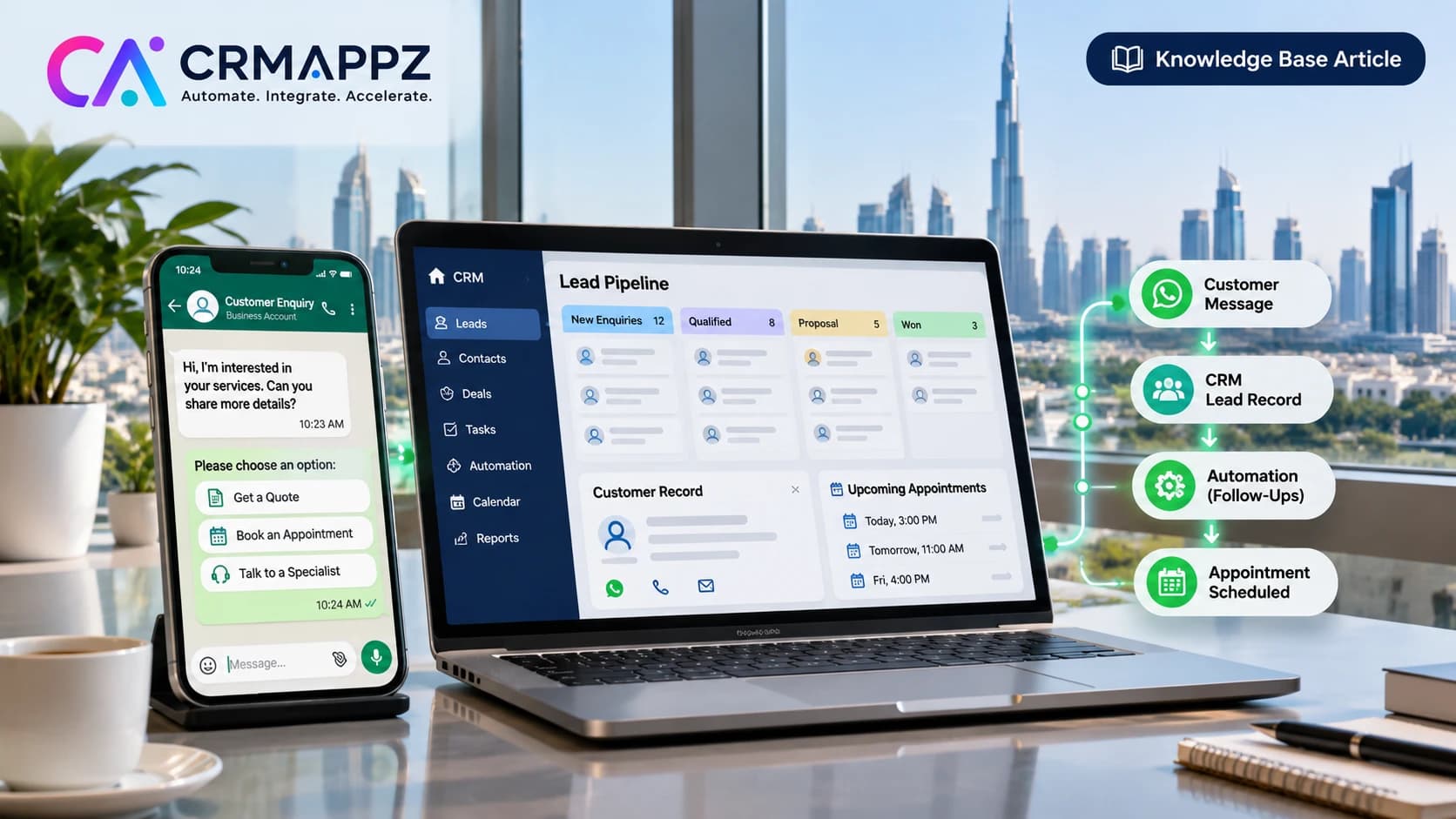
A practical guide for Dubai businesses looking to connect WhatsApp with CRM, automate enquiry capture, manage lead qualification, schedule appointments and keep existing +971 numbers.
Category: CRM & Business Automation
Market: UAE — Dubai, Abu Dhabi and Sharjah
Author: Mubashira Shaik | CRMAppz
On this page
- Why Are Dubai Businesses Struggling to Manage WhatsApp Enquiries?
- What Should WhatsApp CRM Integration Actually Do?
- Can You Connect Your Existing +971 WhatsApp Number to a CRM?
- How Can WhatsApp Enquiries Become CRM Leads Automatically?
- Can WhatsApp Manage Customer Qualification and Appointments?
- Practical Example: WhatsApp CRM for an Independent Real Estate Advisor in Dubai
- Which CRM and Integration Tools Should a Small Business Consider?
- How Much Does WhatsApp CRM Integration Cost in Dubai?
- What About WhatsApp Messaging Rules and UAE Data Protection?
- How CRMAppz Approaches WhatsApp CRM Integration
- How Do You Know Whether WhatsApp CRM Integration Is Working?
- Frequently Asked Questions About WhatsApp CRM Integration in Dubai
Why Are Dubai Businesses Struggling to Manage WhatsApp Enquiries?
Consider an independent business consultant operating in Dubai.
She manages her customer relationships personally and receives enquiries through Instagram, YouTube, LinkedIn, referrals and her website.
Most enquiries eventually become WhatsApp conversations.
One customer wants to understand her services. Another is interested in booking a consultation. A third has already spoken with her and needs a follow-up next week.
When enquiry volumes are manageable, the consultant can respond personally and remember most conversations.
But as the business grows, several practical challenges appear.
Customer information is scattered
Important requirements are buried in different WhatsApp conversations. The owner may need to search through messages to remember what was previously discussed.
Follow-ups depend on memory
A prospect who requested a call next week may not appear in any structured task list. Unless the owner remembers to follow up, the opportunity may be overlooked.
Lead sources are difficult to identify
Customers may contact the business after watching a YouTube video, viewing an Instagram profile or receiving a referral. Without a consistent tracking process, the owner may not know which marketing activities are generating useful enquiries.
Appointments are managed separately
Customer conversations happen in WhatsApp, while appointment details may be stored in Google Calendar or another scheduling application. This creates additional manual administration.
There is no clear view of the enquiry pipeline
The owner may know how many conversations are active but not how many enquiries are qualified, awaiting appointments or requiring follow-up.
WhatsApp works well as a communication channel. The challenge is that conversation history alone may not provide the structure needed to manage customer relationships consistently.
What Should WhatsApp CRM Integration Actually Do?
WhatsApp CRM integration is not simply about connecting a chatbot to a phone number.
A practical solution brings together three distinct functions.
WhatsApp manages customer communication
WhatsApp remains the channel through which customers ask questions, discuss requirements, request information and communicate with the business. Customers should not need to understand the CRM system operating behind the conversation.
The CRM manages customer relationships
The CRM maintains structured customer information. Depending on the business requirements, this can include:
- Contact information
- Enquiry category
- Customer requirements
- Lead source
- Lead or opportunity status
- Conversation notes
- Appointment details
- Follow-up tasks
- Next action and responsible person
The CRM helps the business owner answer important questions. Who contacted us? What are they interested in? Have we spoken before? What stage is the enquiry at? What needs to happen next?
Workflow automation connects the applications
An automation platform can move relevant information between WhatsApp, the messaging inbox, CRM and calendar.
For example, when a new customer selects an enquiry category, the automation can check whether the contact already exists and create or update the appropriate CRM record. It can also record a follow-up activity or coordinate an appointment workflow.
The applications have different responsibilities, but together they support one customer journey.
Can You Connect Your Existing +971 WhatsApp Number to a CRM?
For established businesses in Dubai, this is often the most important concern.
A consultant may have used the same WhatsApp Business number for several years. Customers recognise the number. Referrals arrive through it. Previous conversations contain important customer information.
Changing the number simply to implement a CRM may be undesirable.
The official WhatsApp Business Platform supports different onboarding approaches, including a feature commonly called WhatsApp Business App Coexistence.
Where supported and eligible, Coexistence can allow a business to continue using its WhatsApp Business App while connecting the number to supported WhatsApp Business Platform integrations.
However, eligibility and compatibility must be confirmed before making changes.
Can I continue using WhatsApp Business on my phone?
Potentially, yes. With a supported Coexistence setup, eligible businesses may continue using the WhatsApp Business App alongside an API-connected system. The selected provider, onboarding method and account configuration all matter. A standard API migration should not be assumed to preserve simultaneous WhatsApp Business App access.
What happens to my existing conversations?
Existing WhatsApp conversations should not be assumed to appear automatically in the CRM or connected messaging inbox. History synchronisation and available features depend on the supported onboarding route and provider. Businesses should review backup options, historical message limitations and linked-device behaviour before making changes.
Should I use my existing number for the first demonstration?
Not necessarily. For a business that relies on an established WhatsApp number, testing the proposed workflow through a separate demonstration number is a sensible approach. The owner can evaluate the welcome message, qualification questions, CRM lead creation and handover experience before deciding whether to connect the live number.
Before Connecting Your Existing UAE WhatsApp Number
- Confirm whether you use regular WhatsApp, WhatsApp Business App or an existing API integration.
- Identify who owns the phone number and connected Meta business account.
- Confirm whether retaining the existing number is essential.
- Check Coexistence eligibility through the supported onboarding process.
- Verify that the selected messaging provider supports the intended connection method.
- Review chat history, backup and linked-device limitations.
- Identify WhatsApp features that might change after connection.
- Test the CRM workflow with a separate demonstration number.
- Agree on an onboarding, testing and recovery plan before changing the live number.
Want to See How This Could Work for Your Business?
If you operate a consultancy, real estate advisory or small service business in Dubai, CRMAppz can help you define a focused WhatsApp CRM proof of concept. Begin with one customer journey covering enquiry capture, qualification, CRM lead creation and owner handover.
How Can WhatsApp Enquiries Become CRM Leads Automatically?
Let's look at how customer enquiries typically arrive.
A prospect watches a business video on YouTube and clicks a WhatsApp link in the description. Another visitor discovers the business through Instagram. A third customer uses the WhatsApp contact option on the company website.
Although these customers arrive through different channels, each conversation can follow a consistent enquiry process.
Step 1 — Customer starts a WhatsApp conversation
The customer sends a message through the business's approved WhatsApp communication channel.
Step 2 — Automated welcome and introduction
The system acknowledges the enquiry and introduces the business. Where appropriate, the introduction can include approved business information, enquiry choices or media.
Step 3 — Customer selects the enquiry type
The customer chooses the option relevant to their requirements. For example:
- Request a Quote
- Book a Consultation
- Learn About Services
- Speak to a Specialist
The options should reflect the actual business rather than present an unnecessarily long menu.
Step 4 — Basic requirements are collected
The workflow asks a few relevant questions. For a consulting business, these might include the type of service required, the customer's preferred consultation time or a short description of the problem.
Step 5 — CRM lead is created or updated
The integration checks whether the contact already exists. It then creates or updates the CRM record with relevant details such as the contact number, enquiry category, qualification answers, identifiable source and next action.
Step 6 — The business owner takes over
The owner can review the enquiry details and continue the conversation personally. This avoids repeatedly asking customers for information they have already provided.
Step 7 — Follow-up or appointment is recorded
The CRM stores the next action. Depending on the requirements, this may involve booking a consultation, assigning a follow-up date or updating the lead stage.
Can leads from Instagram, YouTube and LinkedIn be tracked?
Yes, where identifiable tracking information is available. Businesses can use distinct WhatsApp entry links or prefilled messages to help identify the originating channel.
However, lead-source attribution is not always complete. A customer may edit a prefilled message, contact the business directly or share the phone number with someone else. In these situations, source information may require manual confirmation.
Can WhatsApp Manage Customer Qualification and Appointments?
Yes. WhatsApp can support both structured customer qualification and appointment workflows when connected to appropriate systems.
However, not every business needs a sophisticated AI chatbot. For many solo entrepreneurs, a few well-designed questions are sufficient.
Qualification should remain simple
The questions should help the business owner understand the enquiry without making the customer complete a lengthy form. Three or four relevant questions may be enough for an initial assessment. The business can always collect further details during the personal discussion.
Appointment booking
After qualification, the customer may be guided toward an available consultation. Depending on the integration, the process can use a booking link or supported WhatsApp interactions connected to a calendar.
A typical workflow might be:
- Customer completes the initial enquiry.
- The system identifies the appropriate consultation type.
- The customer receives available booking options.
- Calendar availability is checked.
- The appointment is confirmed.
- The CRM records the appointment.
- A permitted confirmation or reminder is sent.
Time zones matter for Dubai businesses
Dubai businesses frequently serve international customers. An appointment booked by someone in London, Mumbai or Singapore must be recorded correctly in the relevant time zone. The integration should handle this consistently to avoid scheduling errors.
Does the business owner remain in control?
Yes. Automation can organise the process, but the owner should still be able to intervene, change an appointment or continue the conversation directly.
Practical Example: WhatsApp CRM for an Independent Real Estate Advisor in Dubai
Consider an independent real estate investment advisor operating in Dubai.
The advisor manages investor relationships personally and receives enquiries through YouTube, Instagram, LinkedIn and referrals.
Potential clients contact her for different reasons. Some are considering investing in Dubai property. Others want to sell an existing asset, review their investment portfolio or request an independent second opinion.
The advisor wants to maintain personal relationships with investors while reducing the time spent collecting basic information and managing follow-ups.
Before WhatsApp CRM integration
A prospective investor watches a video and sends a WhatsApp message. The advisor responds and asks about the investor's requirements. The investor shares some details but is not ready for a discussion.
Meanwhile, another customer asks about selling a property, and an existing investor requests a portfolio consultation.
The advisor must remember which conversations need follow-up, which appointments are pending and what information each investor has provided. Important details remain in the chat history unless recorded manually.
A proposed WhatsApp CRM workflow
1. Welcome and introduction
The investor starts a WhatsApp conversation and receives an introduction to the advisor's services. A suitable welcome experience may include a short introduction, profile information and supported media.
2. Enquiry selection
The investor chooses from options such as:
- Property Investment
- Property Selling
- Portfolio Advice
- Independent Second Opinion
- Speak to the Advisor
3. Investor qualification
The workflow asks a few questions relevant to the selected enquiry. For a property investment enquiry, these might cover investment objectives, approximate budget, property preferences and expected timeline.
4. CRM lead creation
The integration creates or updates a lead record containing the investor's details and qualification responses.
5. Personal advisor handover
The advisor reviews the collected information and takes over the WhatsApp conversation. The system supports the discussion rather than replacing the advisor.
6. Appointment scheduling
If an investor wants to proceed, the workflow facilitates a consultation booking and records the confirmed appointment.
7. Follow-up management
The CRM maintains the lead status and next action. Possible stages include New Enquiry, Qualified, Consultation Scheduled, Discussion in Progress and Follow-up.
What changes for the advisor?
The investor continues using WhatsApp. The advisor continues managing the relationship personally.
The difference is that routine information gathering and record keeping can become more structured. The advisor has a clearer view of enquiries, appointments and outstanding actions.
Why start with a proof of concept?
The initial POC does not need every feature that might eventually be useful. A focused demonstration can begin with one complete journey:
- WhatsApp enquiry
- Qualification
- CRM lead creation
- Owner handover
- Appointment or follow-up
This allows the business owner to evaluate the experience before considering additional features or production onboarding.
More advanced functions, such as paid consultations, opted-in nurture messages and AI-assisted conversation summaries, can be considered separately.
Which CRM and Integration Tools Should a Small Business Consider?
There is no single application stack that suits every Dubai business. The right solution depends on enquiry volume, existing software, reporting requirements, technical preferences and how the owner wants to manage daily activities.
WhatsApp Business Platform
The official WhatsApp Business Platform provides the foundation for supported business messaging integrations. Businesses must consider onboarding requirements, account eligibility, messaging rules and applicable charges.
Chatwoot for conversation management
Chatwoot can provide an inbox for managing customer conversations through supported messaging integrations. The owner can review and respond to customer enquiries while maintaining an organised communication interface. A messaging inbox and a CRM are related but serve different purposes.
SuiteCRM for customer and pipeline management
SuiteCRM is an open-source CRM platform that can maintain structured contacts, leads, opportunities, activities and follow-up tasks. For businesses wanting more structured CRM management or control over their deployment, SuiteCRM may be appropriate. However, self-hosting requires infrastructure, backups, security maintenance and integration work. Businesses considering this approach can explore CRMAppz SuiteCRM implementation services.
n8n for workflow automation
n8n can connect compatible applications through APIs, webhooks and workflow logic. For example, an n8n workflow can receive an incoming enquiry event, check existing CRM records, create or update a contact and initiate the next agreed action. The automation must also account for errors, duplicate events and unsuccessful integrations.
Could a lightweight CRM be enough?
For a solo entrepreneur with straightforward contact management needs, a lightweight CRM or structured workspace may be sufficient. A business should avoid maintaining duplicate customer databases unless there is a clear operational requirement.
Is AI necessary?
Not always. AI-assisted conversation summaries or response suggestions may be useful later, but they are not prerequisites for basic WhatsApp CRM integration. For many businesses, reliable lead capture and follow-up management should come first.
For more information about connecting business applications, explore CRMAppz Integration and API Development.
How Much Does WhatsApp CRM Integration Cost in Dubai?
The cost of WhatsApp CRM integration depends on the scope of the business requirements.
Consider two examples. An independent consultant may need one WhatsApp number, a simple qualification flow, CRM lead creation and appointment tracking. A larger real estate agency may require multiple users, lead assignment, several enquiry paths, reporting and more advanced integration.
Although both businesses need WhatsApp CRM integration, the implementation effort is different.
| Component | What affects the cost |
|---|---|
| WhatsApp Business Platform | Applicable Meta messaging charges and provider arrangements |
| CRM | Subscription costs or self-hosting and maintenance |
| Conversation inbox | Hosted subscription or self-hosted infrastructure |
| Workflow automation | Integration complexity, infrastructure and maintenance |
| Appointment scheduling | Calendar integration and scheduling requirements |
| Implementation | Configuration, customisation, testing and training |
| Ongoing support | Updates, backups, troubleshooting and monitoring |
Is self-hosting free?
Not entirely. Open-source software may avoid some licensing costs, but hosting, security, backups, updates and technical support still need to be considered.
Should a small business start with a POC?
A focused POC can be useful when the business wants to validate the proposed customer experience before committing to a complete implementation. It also helps clarify which features are essential and which can be introduced later.
What About WhatsApp Messaging Rules and UAE Data Protection?
WhatsApp automation should be designed around applicable platform rules and appropriate customer data practices. A CRM integration should not assume that every saved contact can automatically receive promotional or follow-up messages.
WhatsApp's customer service window
When a customer messages a business, a 24-hour customer service window generally applies. During this window, the business can send permitted free-form responses. Outside the window, business-initiated messages require approved WhatsApp templates. Businesses also need to follow applicable consent and messaging requirements. This matters when designing appointment reminders, follow-ups and marketing campaigns.
Customer consent
Businesses should establish how the required customer permission is collected and recorded. An existing contact list should not automatically be treated as a list of customers who have agreed to receive marketing messages. Customers should also have an appropriate way to stop receiving unwanted communications.
Customer information and CRM access
An integrated CRM may contain customer contact information, enquiry details, conversation notes and appointment records. Businesses should consider:
- Which customer information is necessary.
- Why the information is being collected.
- Who can access customer records.
- Where data is processed and stored.
- How long records are retained.
- How data is backed up and protected.
- Whether external service providers process customer information.
Applicable UAE privacy requirements should be assessed according to the business and its operations. For regulated or sensitive information, appropriate legal and security guidance may be required.
How CRMAppz Approaches WhatsApp CRM Integration
At CRMAppz, we approach CRM integration by first understanding how the business currently works.
Before recommending applications or automation, we want to know where customer enquiries originate, how they are handled and which activities create unnecessary manual work.
For a solo entrepreneur, the process may be relatively simple. The owner receives WhatsApp enquiries, asks a few questions, schedules consultations and maintains personal relationships with customers. The goal is to make that process easier to manage rather than replace it with an unnecessarily complicated system.
Understand the customer journey
We begin by identifying the path from the initial enquiry to qualification, personal communication, appointment and follow-up. This helps determine which activities are repetitive and which should remain under the business owner's control.
Identify the integration requirements
We review the existing WhatsApp setup, CRM requirements, calendar usage and other applications involved in the workflow. If the business has an established WhatsApp number, continuity and connection eligibility become important considerations.
Choose the appropriate architecture
Depending on the requirements, the solution may involve SuiteCRM, Chatwoot, n8n and the official WhatsApp Business Platform, or a lighter combination of tools. We aim to keep the architecture appropriate to the business rather than introduce unnecessary components.
Demonstrate one complete workflow
For a small business, we prefer validating the essential customer journey first. A focused POC can demonstrate how an incoming WhatsApp enquiry becomes a CRM lead, how qualification answers are recorded and how the owner takes over the conversation.
Test before production changes
Before a live number or customer-facing workflow is changed, the relevant integrations should be tested. This includes reviewing error handling, duplicate records, appointment accuracy and the ability to continue manual communication.
Expand according to actual business needs
Once the core workflow is dependable, additional automation can be considered. That may include more qualification paths, approved follow-up messages, reporting or carefully controlled AI assistance.
How Do You Know Whether WhatsApp CRM Integration Is Working?
The success of a WhatsApp CRM integration should not be measured only by the number of automated messages sent. The important question is whether the business can manage customer enquiries more consistently and with less unnecessary administration.
For a small business, several practical measures are useful.
| Measure | What it helps evaluate |
|---|---|
| First response time | How quickly new enquiries are acknowledged |
| CRM lead capture rate | Whether incoming enquiries are recorded |
| Qualification completion rate | Whether customers provide the information needed |
| Duplicate contact rate | Whether existing CRM records are reused correctly |
| Appointment booking rate | How many relevant enquiries progress to meetings |
| Overdue follow-ups | Whether agreed next actions are being missed |
| Owner handover success | Whether customer context is available when the owner takes over |
| Integration errors | Whether the messaging, CRM and calendar workflows are operating reliably |
Businesses should understand their existing process before introducing automation. Once the workflow is implemented, the same measures can be reviewed to understand whether it has improved daily operations.
A small business does not necessarily need a complex analytics dashboard. A clear CRM view showing new enquiries, scheduled appointments and overdue follow-ups may already provide useful operational visibility.
Frequently Asked Questions About WhatsApp CRM Integration in Dubai
Can I integrate my existing WhatsApp Business number with SuiteCRM?
Yes. SuiteCRM can be connected to a suitable WhatsApp Business Platform integration through APIs or middleware. Whether you can continue using the WhatsApp Business App simultaneously depends on the number's eligibility, connection method and provider support.
Can I use WhatsApp CRM automation without hiring a sales team?
Yes. Solo entrepreneurs can use the integration to organize enquiries, collect basic customer requirements, manage follow-ups and coordinate appointments while continuing to communicate personally.
Can WhatsApp automatically create leads in SuiteCRM?
Yes. A configured integration can receive relevant WhatsApp enquiry information and create or update SuiteCRM records. Duplicate prevention and error handling should be included.
Can I track leads arriving from Instagram, YouTube and LinkedIn?
Tracked WhatsApp entry links and identifiable source information can help attribute enquiries to these channels. Some enquiries may still require manual source identification.
Do I need an AI chatbot for WhatsApp CRM integration?
No. A business may begin with a simple welcome message, structured enquiry choices, CRM lead creation and appointment management. Advanced AI features can be considered separately.
Can WhatsApp automatically book meetings in my calendar?
Yes, with a suitable calendar or scheduling integration. Depending on the implementation, customers may select available options through supported WhatsApp interactions or an external booking page.
How much does WhatsApp CRM integration cost in Dubai?
The cost depends on the selected CRM, messaging provider, workflow complexity, hosting, integrations and ongoing support requirements. A focused requirements assessment can help define an appropriate scope.
Will I lose existing WhatsApp conversations?
Existing conversation history does not automatically transfer into every CRM or messaging inbox. History synchronisation and backup options depend on the chosen connection method. Review these limitations before making changes.
Can I continue using WhatsApp Business App on my phone?
Potentially. Eligible numbers may support WhatsApp Business App Coexistence through supported onboarding. This must be verified for the specific number and integration provider.
Before Investing in WhatsApp CRM Integration, Identify What Needs Improving
If you operate a consultancy, real estate advisory or service business in Dubai, you may already have many of the applications you need.
You have WhatsApp for customer communication. You may already use a CRM, spreadsheet or another system to maintain customer details. You have a calendar for appointments.
The difficulty may be that these applications are not connected.
Customer information is entered manually. Follow-ups depend on memory. Appointment details are separated from customer conversations.
WhatsApp CRM integration can help connect these activities into a more manageable process.
But the objective should not be to automate every customer interaction.
For businesses built around personal expertise and relationships, customers still value speaking directly with the person responsible for their enquiry.
Planning WhatsApp CRM Integration for Your Business in Dubai?
At CRMAppz, we help businesses connect CRM systems, communication channels and operational workflows through CRM implementation, API integration and business process automation. You do not need a complete technical specification to begin a discussion. Tell us how you currently receive WhatsApp enquiries, how customer information is managed and where your existing process becomes difficult to maintain.
Verification references
CRM capabilities, WhatsApp Business Platform requirements and messaging rules change over time. Confirm the current position against the official sources below before acting.